

 English
 Deutsch
 Español
 русский

Home · News · Industry News · Fiber Optic vs Copper Cabling Trends: What Still Runs the Horizontal Run?
Industry News
Fiber Optic vs Copper Cabling Trends: What Still Runs the Horizontal Run?
2026-10-23Content
If an 800-point office fit-out landed on your desk this week, you would probably cable the horizontal runs in copper and spend the fiber budget on the backbone. That single decision sums up the fiber optic vs copper cabling trend through 2026: fiber keeps absorbing the long-haul, high-density and electrically noisy paths, while copper holds the last 100 metres.
The split comes down to two hard numbers and one practical one. A standards-compliant copper channel stops at 100 metres, and 10GBASE-T over Cat6 stops at roughly 55 metres, while Cat6A carries it the full distance. Fiber pushes 10 Gbps for 10 kilometres without difficulty, but it cannot power a Wi-Fi access point or a ceiling camera without local electronics. That third number, the cost of conversion and a local power outlet at every endpoint, is what keeps copper in the horizontal run.
The practical consequence for anyone specifying or buying structured cabling hardware is straightforward: the medium you choose changes the connectors, panels and cable management you need, and the field quality of those parts decides whether the design actually performs after handover.
Fiber vs Copper: Where Each Medium Wins
Read the deployment scenario first, then the bandwidth headline. Most projects do not fail because the wrong cable was chosen; they fail because the wrong terminations and rack hardware were paired with a perfectly good cable.
| Scenario | Copper (Cat6 / Cat6A) | Fiber (OS2 / OM4) |
|---|---|---|
| Horizontal run to the work area | Default choice; 100 m channel limit, Cat6A supports 10GBASE-T to the full 100 m | Technically workable, but cost per port and per-endpoint media conversion rise sharply |
| Building or campus backbone | Impractical beyond 100 m without active equipment | Standard choice; 10 Gbps over 10 km on single-mode |
| PoE delivery (cameras, access points) | Data and power over one cable; budget heat and insertion loss carefully | Requires a media converter or a switch with optical uplinks plus local power |
| High-EMI zones (motors, drives, medical imaging) | Shielded Cat6A works, but only with correct bonding and grounding | Immune to electromagnetic interference; also isolates buildings electrically |
| Field termination | Toolless connectors cut to a few minutes per outlet | Requires fusion splicing or pre-terminated assemblies and specialist labour |
| Upgrade path | Cat6A is the current horizontal ceiling; re-cabling means new cable pulls | Single-mode headroom allows capacity growth by swapping optics only |
The takeaway: copper remains the default for the horizontal, and fiber wins the moment distance, density or interference becomes a constraint. Very few real projects need only one of them.
Four Trends Actually Moving the Cabling Decision
Cat6A is becoming the horizontal default
Cat5e is now mostly a refurbishment product. Projects that once specified Cat6 are moving to Cat6A because the 55-metre ceiling on 10GBASE-T over Cat6 creates awkward design compromises once cable routes curve around risers and service voids. Choosing Cat6A up front removes that argument from the drawing board and avoids a second cable pull later.
AI and high-density racks are pulling fiber deeper into the building
GPU clusters and storage fabrics push large numbers of optical links from the campus backbone into the rack and even to the top of the row. That shift does not remove copper; it concentrates copper in shorter, denser runs next to the equipment, which changes what patch panels and cable management have to handle.
Shielding is back on the specification sheet
Factories, hospitals, rail depots and any building with variable-frequency drives are specifying shielded Cat6A again. Shielded systems only deliver their benefit when the shield is bonded at both ends through properly designed jacks and panels, so the hardware choice matters more than the cable marketing claim.
On a 1,000-outlet project, saving three minutes per outlet is 50 hours of field labour. That is why toolless terminations have moved from a convenience feature to a tender requirement, and why installers judge connectors by how reliably they seat on the first attempt rather than by catalogue wording.
Why Copper Still Owns the Horizontal Run
Three practical forces keep copper in place. First, endpoint cost: every optical desktop needs a media converter or an optical port, and that cost multiplies across hundreds of outlets. Second, power: PoE switches deliver data and power over the same copper pair set, which removes an electrician from the scope. Third, tooling: any competent installer can terminate copper on site, while fiber still concentrates skills in fewer hands.
Where copper projects go wrong is rarely the cable itself. Moisture in the IDC contacts, an unseated conductor, a face plate that forces an over-bent cable, or a jacket stripped too far back all show up as failed channel tests. On shielded Cat6A, a jack with poor shield continuity can turn a premium cable into an expensive unshielded one.
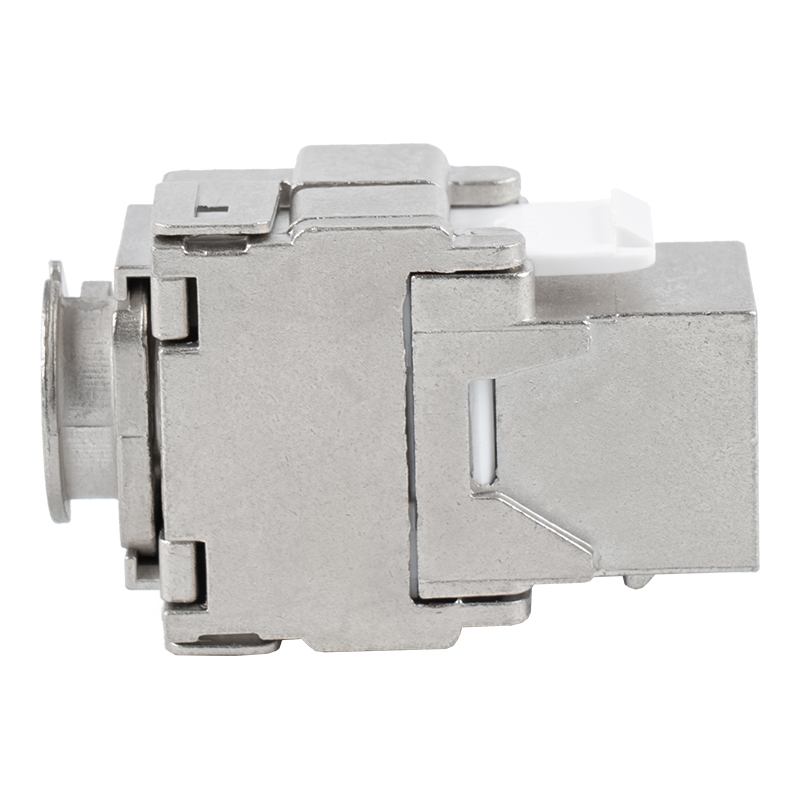 C6A Shielded 180-Degree Toolless Keystone Jack with BracketFor shielded 10GBASE-T horizontal runs, this 180-degree toolless jack pairs a zinc alloy shell with a bracket to support bend radius and shield bonding.View Product →
For 10GBASE-T horizontal work, a 180-degree shielded toolless jack with a supporting bracket keeps the cable bend radius under control while the installer works, and it gives the shield a defined bonding path. That combination addresses the two most common failure points on a shielded run at once.
On the rack side, the choice between an empty frame and a pre-loaded panel changes both the installation sequence and the spare-parts policy. Pre-loaded panels reduce field time, while empty frames let a distributor stock modules separately and build configurations on demand.
 19-Inch 1U Shielded 24-Port Cat6A Patch PanelA pre-loaded 24-port shielded panel for standard 19-inch racks, with Krone IDC termination and Cat6A support up to 10Gbps in structured cabling.View Product →
A 19-inch 1U shielded 24-port Cat6 panel is the workhorse in that middle ground: it fits standard racks, terminates on IDC blocks with familiar colour coding, and keeps the port count per U high enough to avoid a rack full of half-empty panels.
When Fiber Is the Right Call
Specify fiber when the link crosses a building, exceeds the 100-metre channel limit, connects switches at different electrical potentials, or runs through an environment where interference is unavoidable. Single-mode is usually the safer long-term bet for backbone work because capacity upgrades happen at the transceiver, not in the cable tray.
What surprises some buyers is how much of a fiber installation is still conventional rack hardware. Optical patch panels, enclosures and jumpers all occupy rack units, and every one of them needs cable management that respects a minimum bend radius. Loose jumpers hanging off a panel are the fastest way to introduce macrobending loss into an otherwise healthy link.
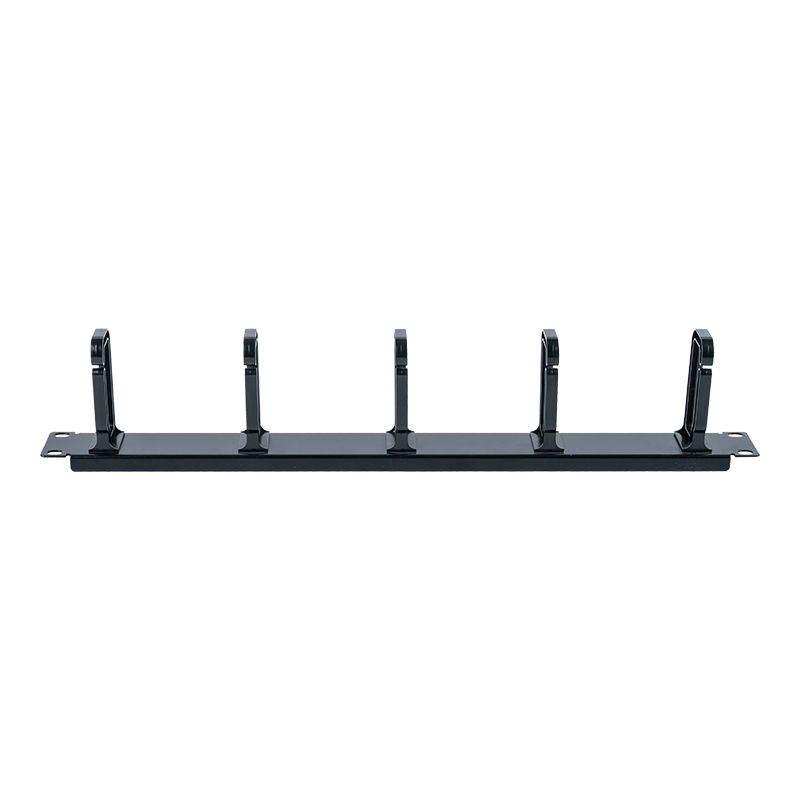 19-Inch 1U Cable Management Panel with Five Plastic RingsKeeps patch cords and fiber jumpers organized in standard 19-inch racks, with five ABS rings that help maintain bend radius and simplify fault tracing.View Product →
A 1U panel with five plastic rings is the small, unglamorous part that keeps fiber and copper jumpers separated, routed with consistent bend radius and easy to trace during a fault. It is also the part most often left off the bill of materials until the first failed link test.
Procurement Checklist Before You Commit
Use this list when comparing quotes, because the differences between suppliers usually sit in the details rather than the headline specification.
- Confirm the category and the tested channel length, not just the cable label; ask whether Cat6A performance is verified to 100 metres.
- Check conductor gauge and PoE budget together. A 23 AWG cable runs cooler than 24 AWG under the same load, which matters in bundled trays and enclosed risers.
- For shielded systems, ask for the bonding and grounding arrangement of the jack and the panel, and how shield continuity is verified on site.
- Verify IDC compatibility with the wire you actually buy, including conductor diameter tolerance and solid versus stranded conductors.
- Ask how module, face plate and panel dimensions fit together, since mixed brands frequently produce gaps, misaligned ports or proud shutters.
- Request the acceptance test method and the pass criteria used for handover, including whether full channel testing is included.
Where a project needs specific port spacing, colour matching, printing or packing standards, the usual route is an ODM/OEM customization programme layered on top of a standard product platform, which keeps tooling cost down while still meeting the buyer's brand specification.
FAQ
Will fiber completely replace copper in the next decade?
Not in the horizontal run. Fiber will keep expanding in backbones, cross-connects and high-density rack links, but the 100-metre copper channel combined with PoE delivery remains the cheapest reliable way to reach desks, cameras and wireless access points. Expect a mixed installation, not a replacement.
Is Cat6 still acceptable for a new office build?
It is acceptable where 10GBASE-T is not planned within the cabling's service life. If 10-gigabit to the desktop is on the roadmap, the 55-metre limit over Cat6 becomes a design constraint, and Cat6A is the lower-risk specification.
Do I need shielded cabling in a normal office?
Usually not. Shielded Cat6A earns its cost in industrial areas, healthcare and any route close to drives or heavy power distribution. Where it is installed, the grounding discipline has to be enforced, otherwise performance can be worse than unshielded.
What causes most copper link failures at handover?
Termination quality, not cable quality. Over-stripped jackets, conductors pushed into the wrong IDC slots, over-bent cables behind face plates and broken shield continuity account for most failed channel tests on new installations.
The fiber optic vs copper cabling trend is less a race than a division of labour. Fiber takes the distances, the density and the electrically hostile routes; copper keeps the last 100 metres because it carries power, terminates quickly and costs less per outlet. The money and the risk sit in the hardware that joins the two worlds: jacks that hold tolerance, panels that are quick to terminate and cable management that keeps bend radius honest.
For teams still aligning terminology before a design review, our overview of the fundamentals of network cabling covers the layer-by-layer structure behind these choices, from the work area outlet to the rack.
Contact Us
Your email address will not be published. Required field are marked*


-
 No. 588, Xiaolin Avenue, Xiaolin Town, Cixi City, Zhejiang Province
-
 [email protected]
-
 +86-574-63507962
-
 +86-15988643730
Copyright Ningbo Betterbell Telecommunication Equipment Co., Ltd. All rights reserved. Structured Cabling Solutions Manufacturer Network Cabling Products Supplier
