

 English
 Deutsch
 Español
 русский

Home · News · Industry News · Cat8 Cabling for AI Data Centers: Where 25G and 40G Copper Still Fits Best
Industry News
Cat8 Cabling for AI Data Centers: Where 25G and 40G Copper Still Fits Best
2026-10-20Content
A 42U rack is being rebuilt around eight GPU nodes and two top-of-rack switches. The bill of materials comes back with shielded Cat8 patch cords, field-terminated Cat8 plugs and a 48-port shielded panel, priced well above the Cat6A kit that went into the same room a year earlier. The justification is one line long: the new NICs negotiate 25G and 40G, so the cabling has to be Cat8.
Cat8 cabling for AI data centers does have a real place, but it is narrower than most quotes suggest. Distance governs the decision before bandwidth does. Cat8 is a 30 m channel technology, and almost every long, high-bandwidth link in a GPU hall is fibre or a direct-attach copper assembly rather than a structured Cat8 run. Buy Cat8 where a 25G or 40G BASE-T port has to reach across a rack, and keep Cat6A, DACs and optics for everything else.
Where Cat8 Earns Its Place in an AI Rack
Cat8 is defined by ANSI/TIA-568.2-D at 2000 MHz and by ISO/IEC 11801-1 as Class I (Cat 8.1, RJ45) and Class II (Cat 8.2, TERA or GG45). All three share the same working envelope: a 30 m channel built from S/FTP construction. IEEE 802.3bq maps 25GBASE-T and 40GBASE-T onto exactly that envelope, which makes the rule refreshingly simple. If the run fits inside 30 m with two connections, Cat8 can carry 25G or 40G over copper. If it does not fit, the category stops mattering.
That produces three defensible use cases in an AI deployment:
- Top-of-rack switch to server NIC, in runs of roughly 2 m to 10 m, where a terminated channel keeps the rack tidy and serviceable instead of trailing loose assemblies.
- Pre-terminated rack ports that can be repatched for 25G or 40G later without pulling new cable through congested trays.
- A single copper channel type carrying mixed 10G, 25G and management or storage traffic, which simplifies spares and labelling across a fleet of identical racks.
What is missing from that list matters more than what is on it. Long 10GBASE-T links belong to Cat6A. Anything above 40G at rack scale belongs to DACs or optics. And the GPU-to-GPU fabric, the traffic that actually makes a facility an AI data center, is almost never a structured copper channel. If the vocabulary of layers, channels and permanent links is new to you, an overview of network cabling is worth ten minutes before the specification is frozen.
What Cat8 Will Not Do for a GPU Fabric
Treating Cat8 as a facility-wide upgrade path is the most common procurement mistake, because copper category ratings are frequently confused with speed ratings.
- It does not replace 100G, 200G or 400G interconnect. GPU fabrics at those line rates use optical transceivers, active optical cables or vendor-coded DACs, and no twisted-pair category reaches them.
- It does not extend 10GBASE-T to 100 m. A Cat8 channel is tested at 30 m; a 65 m run to another row fails the channel limit no matter how good the components are.
- It does not upgrade a mismatched channel. Cat8 cable terminated on Cat6A jacks is a Cat6A channel, and the test report will say so.
- It does not forgive installation quality. 40GBASE-T is sensitive to alien crosstalk, so bundles with crushed bend radii and unbonded shields can pass a continuity check and still fail a proper 2 GHz test.
Port availability is the second reality check. 25GBASE-T and 40GBASE-T ports remain far less common than SFP28, QSFP28 and QSFP-DD cages. Confirm the switch port type before committing to a copper category, because a Cat8 plant sitting behind a fibre-only ASIC is a sunk cost with no upgrade path.
Cat8, Cat6A, DAC and Optics Side by Side
Most AI racks end up with two or three of these options in the same cabinet, each doing the job it is actually good at.
| Option | Rated frequency | Typical in-rack reach | Best fit | Watch out for |
|---|---|---|---|---|
| Cat6A S/FTP | 500 MHz | Up to 100 m | 10GBASE-T server and management links within and between rows | Costs more than Cat6 and is often over-specified for 1G access ports |
| Cat8 / Class I (RJ45) | 2000 MHz | 30 m channel | 25GBASE-T and 40GBASE-T from top-of-rack switch to server NIC | No 100 m option; requires matched Class I connectors and 2 GHz test heads |
| Cat8.2 / Class II (TERA, GG45) | 2000 MHz | 30 m channel | The same band where a non-RJ45 interface is already the site standard | Interface choice and patch cord availability are narrower |
| Passive copper DAC | Not frequency rated | 1 m to 5 m typically | Switch-to-server and switch-to-switch inside one cabinet | Vendor coding locks you in; no field termination or repair |
| Active optical cable or optics | Not frequency rated | 5 m to kilometres | GPU fabric at 100G, 200G, 400G and above | Higher cost per port, plus cleaning and inventory discipline |
Building a Cat8 Channel That Actually Passes
A category rating is a channel claim, not a cable claim. To deliver 30 m of 2000 MHz performance, every element in the path must be rated for it: the cable, the field connector, the keystone interface and the patch panel. Mixing a Class I cable with a Cat6A module lowers the whole link, and the failure shows up in the certification report rather than at the point of purchase.
Termination is where most Cat8 projects lose margin. Shielded S/FTP cable carries foil around each pair, a drain wire and an overall braid, and the connector has to bond all of them with a full 360 degree contact rather than a folded tail. Toolless plugs cut rework time in live racks, which matters when a technician is working in a cabinet that cannot stay offline for long. Keeping pair untwist as short as the connector allows, and inspecting every termination before closing the housing, prevents the most common source of return loss failures.
 Cat8 Shielded Toolless RJ45 Connector for Field TerminationFully shielded Cat8 RJ45 plug for tool-free field termination, with metal housing and reliable contacts for high-speed data center links.View Product →
Rack termination deserves the same discipline. A shielded empty panel that accepts the same Class I modules used at the outlets keeps one channel definition from outlet to switch, and it lets a failed port be replaced as a single module instead of a full panel. Choose the port count around the rack's final GPU density rather than its first build, because adding a second row of panels later costs more than buying the larger frame now.
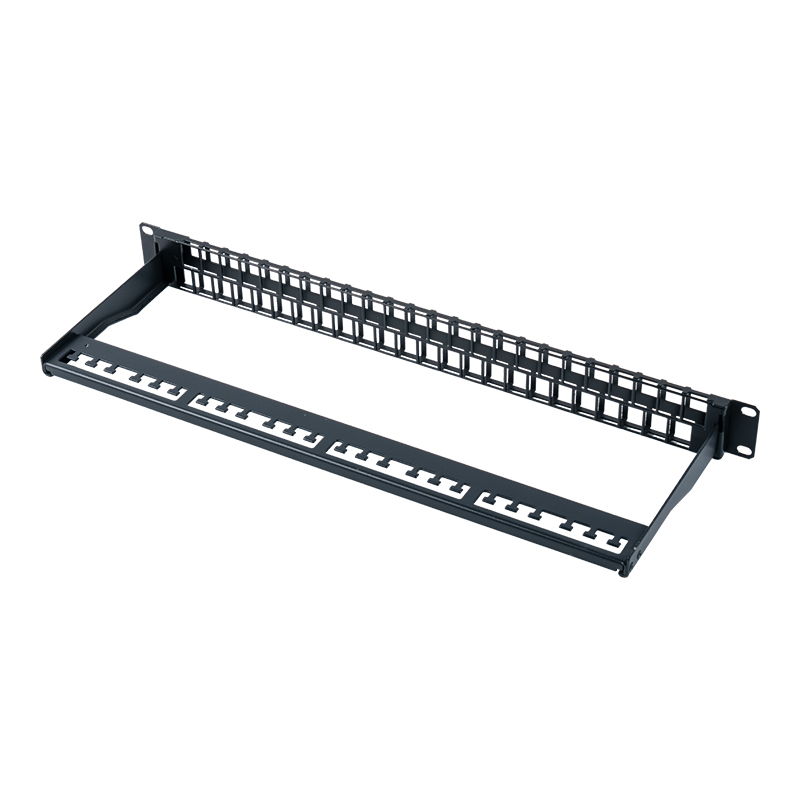 19-Inch 1U 48-Port Shielded Empty Keystone Patch PanelA 1U shielded 48-port empty patch panel for snap-in keystone modules, keeping rack termination modular and high-density in data centers.View Product →
Field testing at 2000 MHz needs a tester fitted with Cat8 or Class I test heads. Those heads are physically larger and slower per link than Cat6A heads, and some otherwise capable testers cannot be upgraded to them at all. Confirm head availability, calibration cycles and the reporting format before the installation is priced, and test both permanent link and channel so that patch cords are covered as well.
Bend Radius, Bundle Heat and Cable Management
Cat8 S/FTP is thicker and stiffer than Cat6A UTP, and that changes two things in a dense GPU rack: how tightly the cable can turn and how much air it blocks. Installed horizontal cable is commonly specified with a minimum bend radius of about four times the outer diameter, and the riskiest spot is never the tray. It is the last 30 cm behind the patch panel, where a technician pushes a bundle aside to seat one more cord.
Angle entry connectors and proper horizontal managers solve most of that. Vertical managers handle the run between the top-of-rack switch and the panel; horizontal managers with brush strips hold the cords in place while still allowing single-cord moves. For a rack that will be repatched repeatedly as GPU nodes are swapped, access speed is worth more than the lowest-cost bracket.
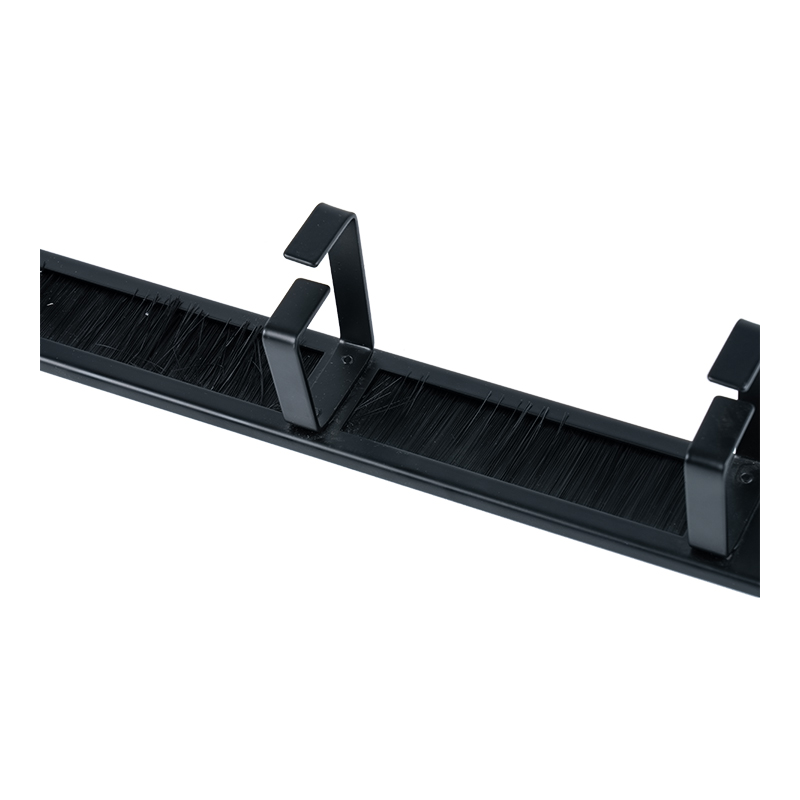 19-Inch 1U Plastic Cable Management Panel with BrushA 1U plastic panel with brush strip that organizes patch cords in 19-inch racks while helping keep cable routes neat and accessible.View Product →
Heat is the quieter issue. Rear-door heat exchangers and dense server populations push ambient temperatures at the back of the rack well above the aisle figure, and attenuation rises with conductor temperature. Full-width bundles make it worse by blocking airflow through the cabinet. Leave fill space in vertical runs, route data cable away from power feeds, and check the manufacturer's temperature derating information before assuming a channel will test the same in a live rack as it did on a bench.
Sourcing Cat8 Components for a Live Deployment
Component consistency is the single largest procurement risk. Panels from one supplier, modules from a second and patch cords from a third can each pass their own inspection and still produce a channel that fails at 2 GHz. Buying the connector, module and panel from one structured cabling manufacturer keeps responsibility in one place when a certification report comes back marginal.
Length and packaging are the second lever. Fixed 3 m cords rarely match a real rack, and excess coil at the rear of the cabinet creates exactly the tight bends the standard warns about. Customised lengths, printed labelling and pre-assembled panel builds can be specified as part of an ODM or OEM programme, which is usually cheaper than buying standard stock and reworking it on site.
A short pre-purchase checklist keeps the order clean:
- Confirm the switch port type: 25GBASE-T or 40GBASE-T before anything else.
- Measure the longest run and confirm it stays inside a 30 m channel with two connections.
- Match the cable, connector, module and panel to the same class.
- Decide the fire rating required for the space, for example plenum-rated jacket where local code demands it.
- Add spare cords and spare modules at the same time as the main order, not as a later expedited shipment.
- Agree the test standard, the test head and the report format before installation begins.
Frequently Asked Questions
Is Cat8 the same as Cat8.1 and Cat8.2?
Functionally yes, physically no. TIA Cat 8 maps to ISO Class I, often sold as Cat 8.1, and uses RJ45 connectors. ISO Class II, or Cat 8.2, uses TERA or GG45 interfaces. Both run to 2000 MHz and a 30 m channel; the difference is the connector interface and the patch cord ecosystem around it.
Can Cat8 run the full 100 m like Cat6A?
No. The 30 m channel limit applies to 25GBASE-T, 40GBASE-T and even 10GBASE-T over Cat8. If the run is longer than 30 m, Cat6A is the correct copper choice for 10G, and fibre is the correct answer above 10G.
Do I need Cat8 for 10GBASE-T?
Not for reach. Cat6A already carries 10GBASE-T to 100 m. Cat8 only adds value below 30 m, or when the same plant has to support 25G and 40G copper ports later.
How do I test a Cat8 link?
With a field tester rated to 2000 MHz and the correct Cat8 or Class I test head. Test the permanent link and the channel, keep calibration records, and store the reports against the port labels, because GPU racks are repatched often and a baseline saves hours during later troubleshooting.
Cat8 is not a blanket requirement for AI infrastructure, and it is not a marketing category either. It is a 30 m, 2000 MHz, shielded channel that solves a specific problem: getting 25G or 40G from a top-of-rack switch to a server NIC over copper, inside a rack, with a plant that can be repatched. Measure the distance first, confirm the port type second, and specify Cat8 only where both answers line up. Everywhere else, Cat6A or a DAC does the same job for less money and less installation risk.
Contact Us
Your email address will not be published. Required field are marked*


-
 No. 588, Xiaolin Avenue, Xiaolin Town, Cixi City, Zhejiang Province
-
 [email protected]
-
 +86-574-63507962
-
 +86-15988643730
Copyright Ningbo Betterbell Telecommunication Equipment Co., Ltd. All rights reserved. Structured Cabling Solutions Manufacturer Network Cabling Products Supplier
