

 English
 Deutsch
 Español
 русский

Home · News · Industry News · Keystone Jack Wiring Diagram: T568A vs T568B, Steps, and Common Mistakes
Industry News
Keystone Jack Wiring Diagram: T568A vs T568B, Steps, and Common Mistakes
2026-09-11Content
You are standing in front of a wall outlet, holding a Cat6 keystone jack and a freshly stripped cable. The module has tiny color marks on the side, but you are not sure whether to wire it as T568A or T568B. Here is the short answer: for almost every office, home, and data-center network, use T568B on both ends of the run. T568A is necessary only when the customer or a legacy phone system specifies it. This article explains how to read a keystone jack wiring diagram, what the T568A/T568B labels mean, how to terminate the jack correctly, and how to avoid the field mistakes that cause most link failures.
What a Keystone Jack Wiring Diagram Shows
A keystone jack wiring diagram is the color-to-pin assignment printed on the module body or included in the packaging. It tells you which conductor to place into each insulation-displacement contact (IDC) slot. Keystone jacks are used in wall plates and patch panels, and they terminate the horizontal cable that runs to the telecom room. Almost every 8P8C/RJ45 keystone jack follows one of two wiring schemes defined by TIA/EIA-568: T568A or T568B. Both use the same eight wires, but the orange and green pairs are swapped.
| Pin | T568A | T568B |
|---|---|---|
| 1 | White/Green | White/Orange |
| 2 | Green | Orange |
| 3 | White/Orange | White/Green |
| 4 | Blue | Blue |
| 5 | White/Blue | White/Blue |
| 6 | Orange | Green |
| 7 | White/Brown | White/Brown |
| 8 | Brown | Brown |
If your installation has no specified standard and existing cables are already terminated, match the keystone jacks to whatever pinout is used on the other end of the horizontal link. A mixed single link can cause a wiremap failure.
T568A or T568B: Which One Should You Use?
Start with T568B unless you have a reason not to. T568B is the default in most office and enterprise installations, and many patch panels and keystones print T568B icons more prominently. T568A is functionally identical for Ethernet performance, but the wiring scheme is different: the orange and green pair positions are flipped on pins 1, 2, 3 and 6.
Here is the practical difference:
- Pin 1-2: T568A uses the Green pair; T568B uses the Orange pair.
- Pin 3-6: T568A uses the Orange pair; T568B uses the Green pair.
- Pins 4-5 and 7-8: Blue and Brown pairs are unchanged.
The choice does not affect speed. What matters is that both ends of the same permanent link use the same scheme. If one end is T568A and the other is T568B, the orange and green pairs become reversed, creating a crossover that many network cards may not negotiate correctly in a structured cabling environment.
Why consistency matters
Horizontal cabling is not a direct cable between two switches; it goes from a patch panel in the telecom room to a wall outlet at the workstation. You want the exact same color mapping on both sides. Write the chosen standard on the patch panel labels and keep a simple reference at each new termination point.
How to Terminate a Keystone Jack: Step-by-Step
Having a reliable process is more important than memorizing a diagram. Use this sequence for every keystone jack you terminate.
- Strip the jacket. Remove about 25 mm (1 in) of the outer cable jacket. Make the cut with a purpose-made stripper so you don't damage the inner insulation.
- Keep the pairs twisted. Untwist only the section that will sit in the IDC slots. For Cat6, keep the untwisted length under 13 mm (0.5 in). Longer untwisted sections increase crosstalk and return loss.
- Read the color code. Use the T568B label printed on the module. Place each conductor into its matching slot, keeping the pairs in the order shown on the label.
- Terminate. For a traditional modular jack, press each conductor with a 110 punch-down tool. For a toolless module, close the cap or slide the locking cover until the IDC contacts cut through the insulation.
- Trim and inspect. Cut off excess wire, confirm that no pair is reversed, and make sure the outer jacket is inside the strain-relief clip.
- Test the link. A wiremap tester verifies pairs, polarity, shorts, and opens before you close the wall plate.
A traditional punch-down keystone gives a stable connection, but a toolless module can reduce termination time. If you are installing a large number of jacks, a Cat6 toolless keystone with a flip-open cover lets you lock all conductors in position without carrying a punch-down tool.
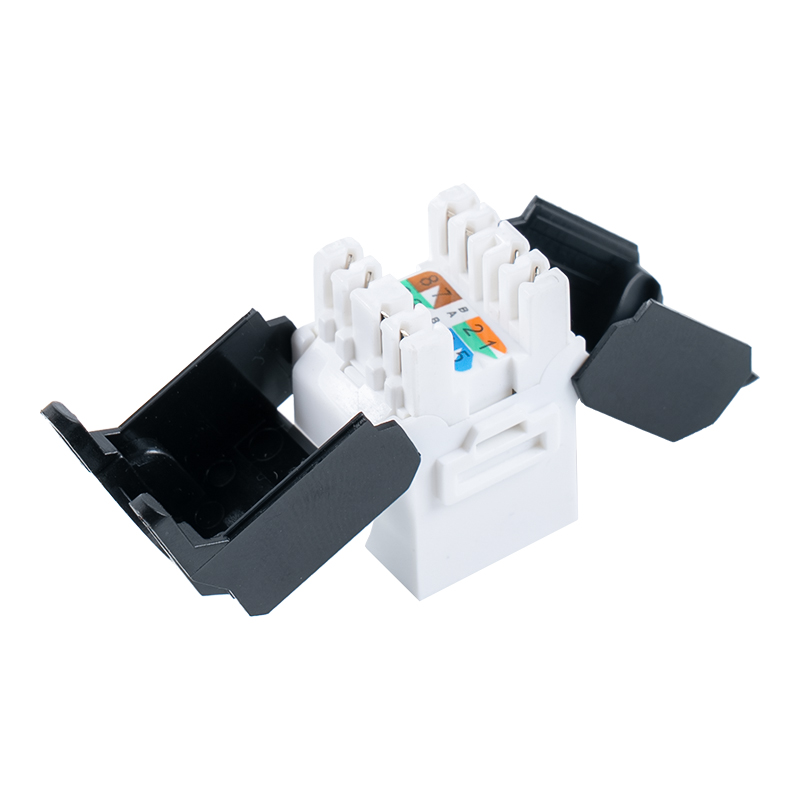 Cat6 Toolless Keystone Jack with Flip-Open CoverThis unshielded modular jack supports tool-free termination and 180° straight cable entry, reducing installation time in dense patch panels. Its dual-hinged design fits tight spaces while complying with Cat6 standards for 10Gbps networks.View Product →
Common Keystone Jack Wiring Mistakes
Most field failures are caused by a small group of predictable errors. The chart below shows a typical mix of those errors.
- Untwisted too long (35%)
- Wrong pair order (25%)
- Shield not grounded (15%)
- Contact not seated (15%)
- Missing strain relief (10%)
Here is what to look for in each category:
- Untwisted conductors. Too much untwisting changes the pair geometry and raises near-end crosstalk. Keep the twists as close to the IDC contacts as possible.
- Wrong pair order. With the eight colors on a module, it is easy to reverse the orange and green pairs. Use the printed diagram, not memory.
- Shield not grounded. In a shielded keystone, the drain wire and foil must connect to the module's shield contact. An ungrounded shield can fail radiated emissions and immunity tests.
- Contact not seated. A punch-down blade needs to push the conductor deep enough into the IDC. A light punch leaves the wire on top and the link intermittent.
- Missing strain relief. The rear clip should hold the outer jacket. If the jacket is not secured, every pull on the cable will stress the terminations.
Choosing the Right Keystone Jack for Your Project
After you understand the wiring diagram, the remaining decisions are about performance class, shielding, and mechanical construction.
Performance Class: Cat5e, Cat6, or Cat6A?
| Property | Cat5e | Cat6 | Cat6A |
|---|---|---|---|
| Bandwidth | 100 MHz | 250 MHz | 500 MHz |
| Max data rate | 1 Gbps | 10 Gbps up to 55 m | 10 Gbps up to 100 m |
| Typical use | Basic office, home | Office LAN, HD video | Data center, high-density |
Cat5e is still acceptable for simple 1 Gbps links, but Cat6 gives more headroom for PoE and future upgrade paths. Cat6A is the safer choice when cable lengths are close to 100 m and you want 10 Gbps end to end.
Shielded vs. Unshielded
Unshielded twisted-pair (UTP) keystones are easier to terminate and less expensive. Shielded keystones are needed in environments with motors, inverters, or other electromagnetic sources. If you install shielded, the entire channel, including cable, connectors, and patch panel, must maintain a continuous shield to ground.
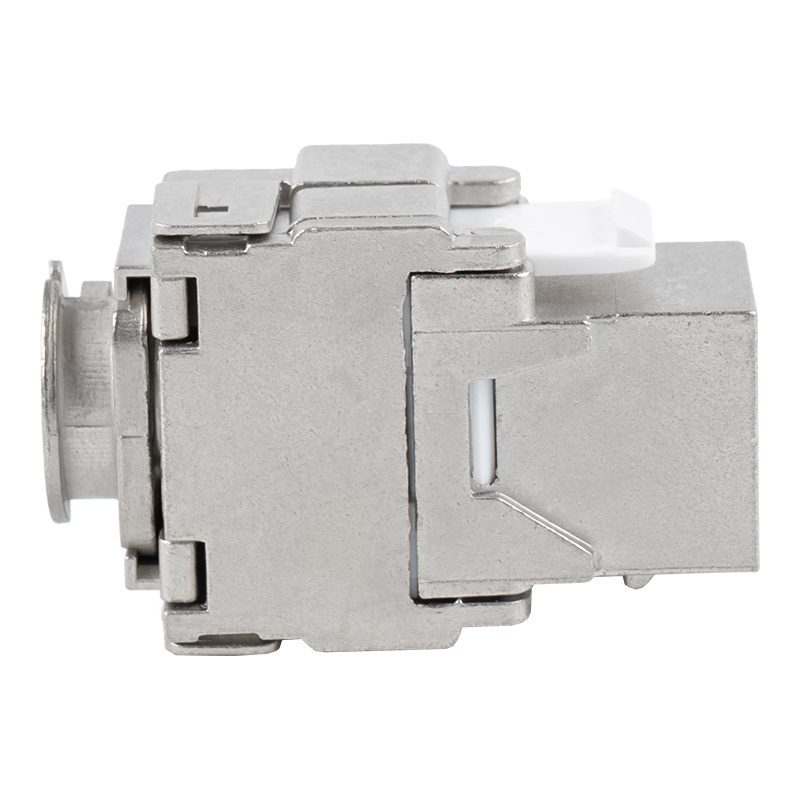 Shielded Cat6A Toolless Keystone Jack with 360° Metal ShellThis shielded keystone features a zinc alloy shell with 360° EMI protection and a dustproof shutter, ideal for high-interference environments. Its 180° toolless design suits shallow boxes and patch panels, supporting 10Gbps transmission and reliable locking.View Product →
Mechanical Design
90° modules are useful in shallow wall boxes because the cable exits at a right angle. 180° modules route the cable straight out, which suits patch panels. Toolless designs reduce labor cost and typical errors. If you need a custom color code, housing color, or OEM label, discuss it during the design stage; manufacturers like BTBL offer customization options for keystone jack production.
A supplier that controls its molding, plating, and assembly process is easier to qualify than a trading company. Ask for samples, verify the wiremap, and test the module with the cable you plan to use before committing to a full purchase order.
Keystone Jack Wiring FAQ
Can I use T568A on one end and T568B on the other?
No. In a hidden horizontal link, both ends must match. A T568A-to-T568B combination is a crossover, and it will not produce a reliable Ethernet link in most structured cabling installations.
Does T568A vs. T568B affect speed?
No. Both are straight-through wiring maps and support the same data rates. Speed is mainly determined by the cable category, length, and termination quality.
How long can I untwist the pairs on a Cat6 keystone?
Keep the untwisted section as short as possible. Thirteen millimeters (0.5 in) is a common upper limit for Cat6. For Cat6A, even less is better because tighter pair geometry preserves the high-frequency margins.
Do toolless keystones need a punch-down tool?
No. Toolless modules use a cover or lever to press conductors into the IDC contacts. You still need a cable stripper and a wiremap tester, but you do not need a 110 punch-down tool.
How can I tell whether a module is Cat6 or Cat6A rated?
Look for the printed category marking on the module housing or cable entry. A keystone without a category marking is not a safe choice for a data network. If you need help with a specific module, contact the manufacturer for technical support.
Contact Us
Your email address will not be published. Required field are marked*


-
 No. 588, Xiaolin Avenue, Xiaolin Town, Cixi City, Zhejiang Province
-
 [email protected]
-
 +86-574-63507962
-
 +86-15988643730
Copyright Ningbo Betterbell Telecommunication Equipment Co., Ltd. All rights reserved. Structured Cabling Solutions Manufacturer Network Cabling Products Supplier
