

 English
 Deutsch
 Español
 русский

Home · News · Industry News · Cable Manager for Data Center Rack: Choosing the Right 1U or 2U Design
Industry News
Cable Manager for Data Center Rack: Choosing the Right 1U or 2U Design
2026-10-02Content
- 1 What a Cable Manager for a Data Center Rack Actually Has to Do
- 2 1U or 2U: Space, Access and Airflow
- 3 Brush, Ring or Covered Slot: Choosing the Front Face
- 4 Horizontal and Vertical Managers Work as a Pair
- 5 An Installation Sequence That Avoids Rework
- 6 Details in a Quotation That Decide Whether It Fits
- 7 Frequently Asked Questions
A 45U rack with 24 patch panels looks tidy on handover day. Six months later the same rack carries 48 extra Cat6A patch cords, each about 6.5 mm in outside diameter, and the bundle curving around the side of the cabinet has grown to roughly 40 mm across. If nothing supports that bundle, the weight hangs on the RJ45 latch and the copper pairs directly behind the plug.
That is why we choose a cable manager for a data center rack by three numbers first: the bundle diameter it must hold, the minimum bend radius of the cable it carries, and the U positions your rack elevation can spare. Colour, finish and slot count matter, but they are second-order decisions.
This guide turns those numbers into a 1U or 2U choice, explains when a brush strip beats plain rings, and lists the details in a quotation that reveal whether the part will still fit once the rack is full.
What a Cable Manager for a Data Center Rack Actually Has to Do
Three jobs, in order of importance: carry load, protect bend radius, and keep runs separable.
Carry the load. A 2 m Cat6A patch cord weighs about 55 to 65 g. Forty-eight of them add roughly 3 kg of cord mass to the front of a 24-port panel, and that load shifts every time a technician pulls a cord. The manager takes the strain off the latch and the first 30 mm of cable. Skip it and the usual symptom is a port that passes certification on day one and fails intermittently a year later.
Protect the bend radius. Under load, a twisted pair cable should not bend tighter than about four times its outside diameter. At a 7.0 mm outside diameter, a Cat6A cord needs a 28 mm radius. One rack unit is only 44.45 mm tall, so the entire exit path, from plug past the panel into the manager, has to complete inside a channel barely one and a half times the cable's own bend diameter. Deep channels with rounded fingers allow that; flat slots with sharp corners do not.
A manager that is generous for Cat5e can be too shallow for Cat6A in the same rack, so the cable mix, not the cabinet size, should drive the selection.
1U or 2U: Space, Access and Airflow
Start with the conclusion: for a top-of-rack position that will receive more than about 30 copper patch cords, use a 2U brush manager. For managers placed between individual patch panels inside the same row, 1U is normally enough.
The arithmetic behind that rule is simple. One rack unit is 44.45 mm. A 1U panel with a lift-off cover and 24 defined slots accepts about 24 cords at 6.0 to 6.5 mm outside diameter, and fewer if the cords are pre-bundled, are fiber, or carry moulded boots. A 2U manager doubles the vertical channel to 88.9 mm and in practice more than doubles usable capacity, because the cords no longer compete for one opening.
| Manager style | Height | Best position in the rack | Cord access | Typical cords served |
|---|---|---|---|---|
| Slotted panel with lift-off cover, 24 slots | 1U (44.45 mm) | Between patch panels, documented links | Cover removed for changes | Up to 24 |
| Open panel with 5 plastic rings | 1U (44.45 mm) | Racks with frequent moves and changes | Open front, re-route by hand | 12 to 24 per ring group |
| 4-ring panel with brush strip | 1U (44.45 mm) | Mixed copper and fiber, airflow-sensitive zones | Brush plus rings | 24 to 48 depending on diameter |
| Brush management stand | 2U (88.9 mm) | Top of rack, dense copper bundles | Deeper channel, front opening | 48 or more |
Airflow deserves a separate note. An empty 1U opening between two panels is a low-resistance bypass path: air that should cross the equipment short-circuits through the gap instead. A brush strip restricts that path while still letting cords through, which is why brush designs are common directly above switch and server intake areas, while plain rings remain common between patch panels where the pressure difference is small.
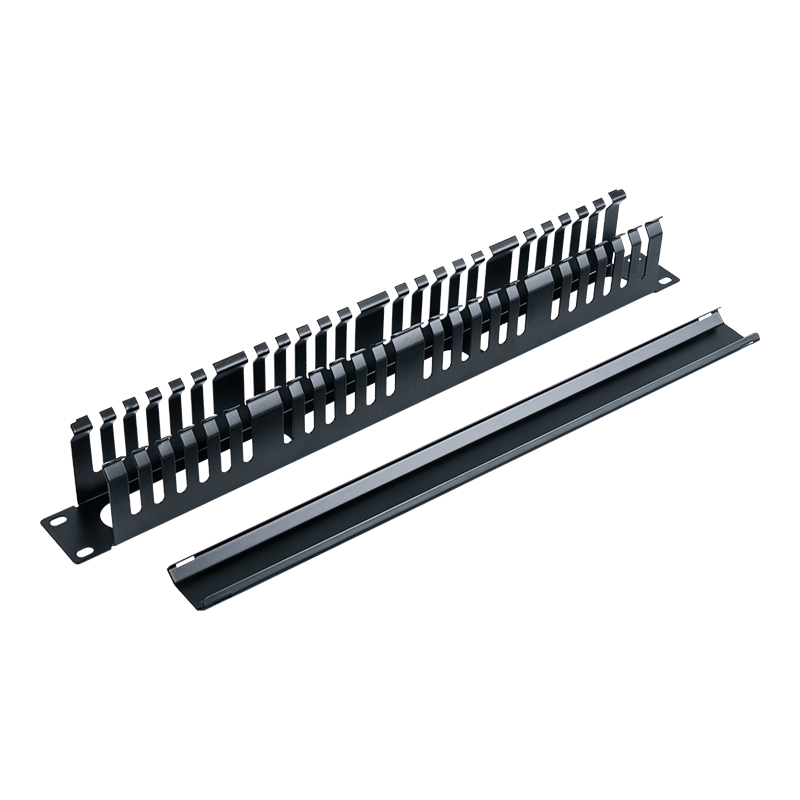 19-Inch 1U 24-Slot Cable Management Panel with CoverCovered 24-slot organizer for standard 19-inch racks, useful where neat cable separation and reduced open rack space matter.View Product →
Brush, Ring or Covered Slot: Choosing the Front Face
Most quotation sheets list brush, ring and cover versions of the same 19-inch panel, and buyers often choose on appearance. The better question is how often the link will be touched. Our cable manager range is organised around that question, because the three front-face types solve different problems.
Brush strips
Brush filaments of roughly 0.2 to 0.3 mm bend around a cord rather than forcing it into a fixed slot. That suits two situations: mixed copper and fiber in one opening, and airflow-sensitive positions above equipment intakes. The trade-offs are insertion drag when a cord is pushed through, and dust collecting in the filaments in a dirty environment. Brush managers are also less convenient when six cords have to be re-routed at once.
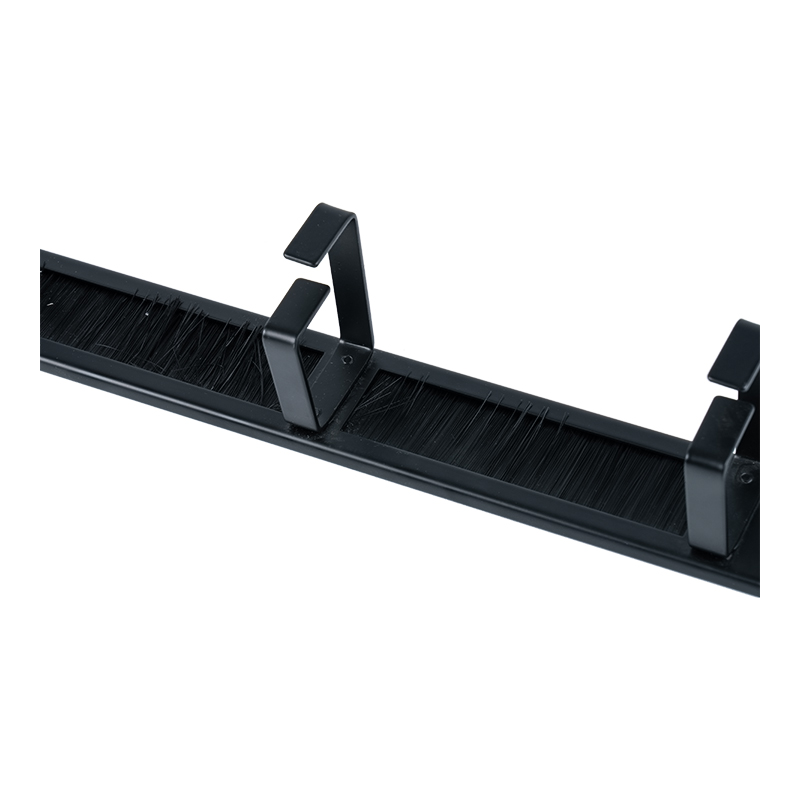 19-Inch 1U 4-Ring Cable Management Panel with BrushCombines four rings with a brush strip for standard racks, helping organize patch cords while limiting open airflow paths.View Product →
Plastic rings and fingers
Rings divide the opening into fixed lanes. A five-ring 1U panel gives each bundle its own channel, which makes colour separation by service or tenant straightforward and stops a re-routed cord from disturbing its neighbours. The weakness is retention: a cord pulled sideways can slip out of an open ring, and rings do not restrict air the way a brush strip does.
Slotted panels with covers
A 12-slot or 24-slot panel under a lift-off cover is the tidiest option for links that rarely change. Cords are pressed into defined slots, and the cover holds everything in place during cleaning and transport. The cost is access: any change means removing the cover in front of a live panel. Choose this type for structured, documented links rather than ports that change monthly.
Horizontal and Vertical Managers Work as a Pair
A horizontal manager handles only the last 300 mm of a cord. The rest of the run, down the side of the rack and across to the next cabinet, belongs to the vertical manager, and the two must agree on bundle size.
Vertical managers are usually 300 mm wide on each side of a 42U or 45U rack, with fingers spaced 40 to 60 mm apart. Fill them to about 70 to 80 percent of the finger depth; beyond that, cords press on each other and the outermost run loses its bend radius against the door. Leave 150 to 200 mm of service loop at the bottom so the rack can slide out without pulling on terminations.
Inside the row, a 1U panel with five plastic rings in front of each patch panel gives every bundle a defined entry point into the vertical channel, so the side manager never has to sort loose cords.
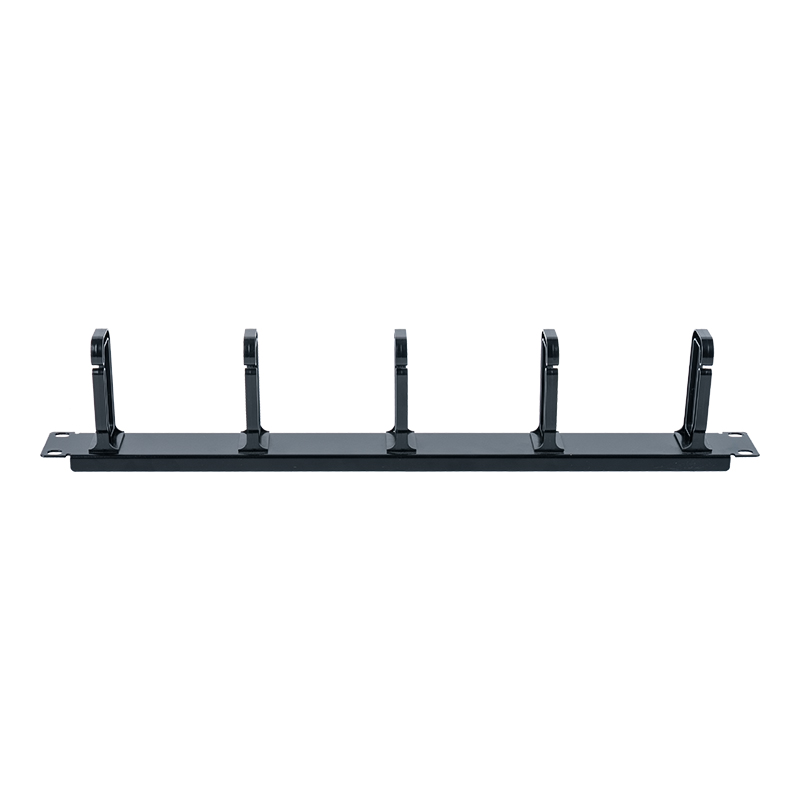 19-Inch 1U Five-Ring Plastic Cable Management PanelFive-ring 1U panel for standard racks, giving each patch bundle a defined entry point toward vertical cable management.View Product →
An Installation Sequence That Avoids Rework
The order of work matters more than the parts list. In practice, most rack rework traces back to a small number of causes, and none of them is a defective component.
- Tight bend radius: 34%
- Unlabelled runs: 28%
- Overloaded manager: 22%
- Airflow blockage: 16%
- Reserve U positions first. Plan 1U of manager above and below every 24-port patch panel, and mark the positions on the rack elevation before any cage nut goes in.
- Mount the managers before the panels. Screws align more easily on an empty rail, and the manager sets the reference line the panel then follows.
- Split left and right. Send cords from odd-numbered ports to the left channel and even-numbered ports to the right. This single convention removes most crossing in the middle of the rack.
- Respect the first bend. Keep the run behind the panel at 28 mm or more for Cat6A, and never let a cord turn inside the panel's own depth.
- Label both ends before the cover goes on. A label at the plug and at the far end costs seconds now and saves an hour during a fault.
- Re-check fill after the last cord. If the brush opening is more than about 80 percent occupied, split the bundle into a second manager or move to a 2U position.
Details in a Quotation That Decide Whether It Fits
Rack dimensions are standardised, but small differences decide whether a manager installs cleanly.
- Mounting width: 19-inch rails use 465.1 mm hole spacing and panels are 482.6 mm wide, with a tolerance of roughly plus or minus 1.6 mm. Ask for the drawing, because a panel a single millimetre over can jam between rails.
- Height: 1U is 44.45 mm and 2U is 88.9 mm. Confirm the finished height after coating, not the nominal value.
- Material and finish: ABS for plastic bodies; SPCC cold-rolled steel of 1.0 to 1.2 mm for metal versions, with powder coating or zinc plating on load-bearing parts.
- Fire rating: plastic parts should carry a UL94 V-0 rating for equipment installed in a data hall.
- Static load: request a tested figure. Around 5 kg is a reasonable minimum for a 1U horizontal manager in a copper rack.
- Hardware and bonding: check whether M6 cage nuts and screws are included, and remember that a metal manager only contributes to grounding continuity if the installer bonds it.
For projects with specific slot counts, colours, branding or screw types, an ODM or OEM supplier can adjust tooling and packaging instead of forcing the site to accept a standard part, which is what our customization options are built around.
Frequently Asked Questions
How many cable managers does one rack need?
A working rule is one 1U horizontal manager per patch panel, or one per two panels when cords are 6 mm or smaller, plus vertical managers on both sides. A rack with 24 patch panels will usually end up with 24 to 36 horizontal pieces.
Is a plastic manager strong enough for Cat6A bundles?
Yes, when the body is thick enough and the mounting brackets are metal. Look for a stated static load, and check that the panel does not flex when a full bundle is pulled sideways.
Brush or ring for fiber?
Brush. Fiber patch cords are 2.0 to 3.0 mm in diameter and tolerate less side pressure than copper. Brush filaments spread the contact and keep the fiber well inside its minimum bend radius. Rings work only if the fiber has its own lane and is never stacked.
Do I need a shielded cable manager?
No. Shielding is a property of cords and modules, not of the manager. A metal manager adds mechanical strength and, when bonded, a grounding path, but it does not shield a cable.
Choosing a cable manager for a data center rack comes down to bundle diameter, bend radius and the U positions you can spare. Get those three right and everything else, brush or ring, 1U or 2U, plastic or steel, follows from how often the rack will be touched. BTBL has manufactured cable managers and structured cabling components in Ningbo since 2002 and supplies them with the drawings and load figures needed to confirm a fit before the rack is built.
Contact Us
Your email address will not be published. Required field are marked*


-
 No. 588, Xiaolin Avenue, Xiaolin Town, Cixi City, Zhejiang Province
-
 [email protected]
-
 +86-574-63507962
-
 +86-15988643730
Copyright Ningbo Betterbell Telecommunication Equipment Co., Ltd. All rights reserved. Structured Cabling Solutions Manufacturer Network Cabling Products Supplier
