

 English
 Deutsch
 Español
 русский


Home · News · Industry News · Horizontal vs Vertical Cable Managers: A Practical Server Rack Planning Guide
Industry News
Horizontal vs Vertical Cable Managers: A Practical Server Rack Planning Guide
2026-11-13Content
Open a 42U rack after a routine switch replacement and the problem is rarely the electronics. It is the patch cords: a 48-port switch, two 24-port panels, and a bundle of 1 m cords sagging into the next U space. The quickest fix is not to buy more Velcro. It is to separate two jobs: port-level patching and rack-level cable travel. Horizontal and vertical cable managers do different work, and most racks need a mix of both.
Quick answer: use both, but for different cable paths
If a cable leaves a port and lands on a patch panel in the same U or the next U, use a horizontal manager. If a cable travels up or down the side of the rack, or between cabinets, use a vertical manager. A horizontal manager is not a substitute for a vertical one, and a vertical manager cannot keep front patch cords out of switch ports. The table below gives the short version.
| Decision point | Horizontal cable manager | Vertical cable manager |
|---|---|---|
| Mounting | Across the 19-inch rack width, usually 1U or 2U | Along the side of the rack or cabinet, often full height |
| Main job | Guide front patch cords and hold local slack | Carry bundles between U positions and cabinets |
| Best fit | Dense patch fields, switch-to-panel links | Backbone runs, multi-switch racks, frequent moves |
| Watch for | Overfilled covers, blocked ports | Door clearance, rear access, airflow |
What a horizontal cable manager does
A horizontal cable manager mounts across the rack width and sits between switches and patch panels. It guides patch cords from the front ports to the side of the rack, holds slack, and keeps bundles from hanging in front of idle ports. Common forms include slotted panels with covers, metal or plastic rings, and brush strips. Its job is front-to-side patching at the port field, not long vertical travel.
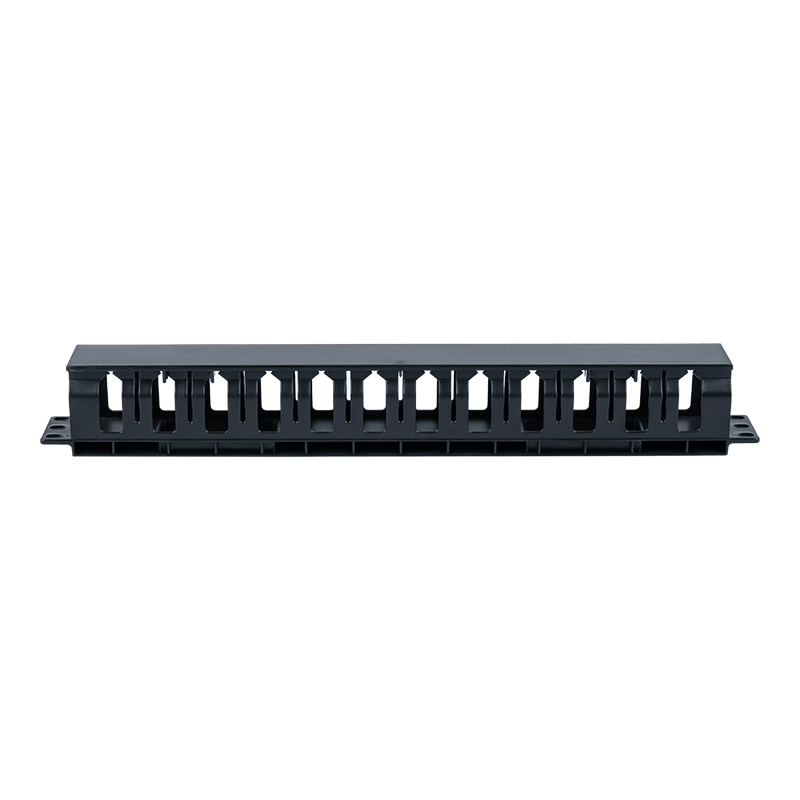 1U Plastic Cable Management Panel with 12 Slots and CoverA 19-inch 1U ABS panel with 12 slots and a cover, suited to guiding and containing patch-cord bundles between switches and patch panels.View Product →
In a dense 24-port or 48-port patch field, a horizontal manager should be part of the port plan. A practical pattern is to place a 1U manager between each 24-port group and the switch below it, then repeat. If the rack uses 48-port switches, two 1U managers or one 2U manager may be easier to service than one tightly packed 1U unit. The cover should close without compressing the bundle; if it needs force, the fill is too high.
- Use one horizontal manager per 24-port group as a starting point.
- Leave enough slack to remove a switch without unplugging every cord.
- Route left and right where possible to shorten patch runs.
- Keep covers accessible; a manager that is hard to open will be left open.
What a vertical cable manager does
A vertical cable manager runs along the side of a rack or cabinet, often from top to bottom. It carries backbone bundles, switch-to-switch links, and cables that move between U positions. In a cabinet, it may be a side channel with fingers, rings, or brush entries; in a two-post rack, it may be a vertical panel at the side. Its value is reducing strain and disorder when many cables share the same vertical path.
Vertical managers matter most when the rack has several switches, frequent moves, or a mix of front and rear cabling. Without a side path, cables cross U spaces diagonally, block fan trays, and make patch panel changes slower. With a side path, the front of the rack stays mostly horizontal and the side handles the vertical runs. This separation is also easier to label: port fields stay one way, rack travel stays another.
Do not mount a vertical manager where it blocks cabinet doors or rear service access. Check side clearance and door swing before ordering. A manager that fits the rack but not the aisle is a return.
How to choose without overbuying
Start with the cable path, then the port count. Draw the route from each switch port to its patch panel port. If the route crosses more than one U, plan a vertical path. If it stays within the same U or adjacent U, plan a horizontal manager. If the rack has both patterns, put a horizontal manager at each patch field and a vertical manager on at least one side. Use both sides when cable volume is high or when left/right routing keeps bundles shorter.
- Count ports, not just switches. A 48-port switch can create 48 front cords plus uplinks.
- Estimate bundle diameter after termination, not before. Connectors and boots add bulk.
- Keep fill below about 50 percent of the manager's usable channel so covers close and cables move.
- Check airflow and service access. A tidy rack that cannot be serviced is still a bad layout.
For standard 19-inch racks, BTBL’s cable manager range includes slotted panels, ring panels, and brush versions; match the style to whether you need cover protection, quick access, or dust control.
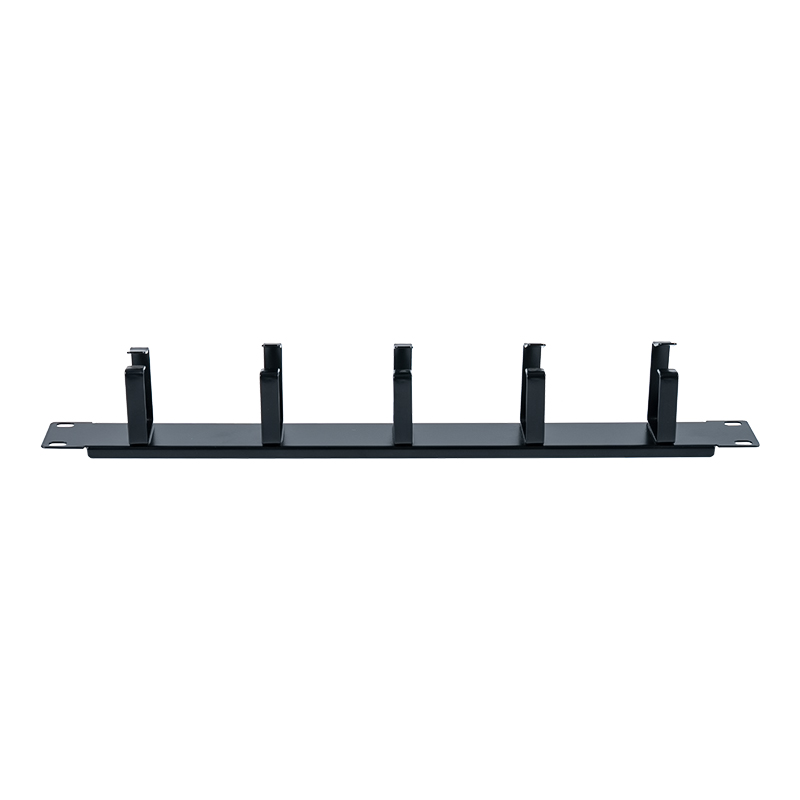 1U Full-Metal Cable Management Bracket with Five RingsA 19-inch steel ring panel for front or rear rack mounting, useful for separating small bundles and maintaining bend radius in patch fields.View Product →
A 1U 12-slot panel is often enough for a 24-port field if cables are short and routed left/right. A 2U brush panel is better when bundles are larger or when moves are frequent.
Common installation mistakes
Most cable manager problems come from buying the right part for the wrong path. Watch these first:
- Using only vertical managers and expecting front patch cords to stay clear.
- Loading a horizontal manager until the cover will not close.
- Using 1 m patch cords in a dense rack, then creating loops to take up slack.
- Mounting a vertical manager where it blocks rear access or cabinet doors.
- Mixing data and power in the same channel instead of keeping separation.
- Skipping labels, so the next move takes twice as long.
A simple bill of materials for a 42U rack
For a 42U cabinet with three switches and two 48-port patch fields, a practical starting point is:
- Four 1U horizontal managers with covers for the front port fields.
- One 2U brush horizontal manager at the cabinet entry for bundled cables.
- One or two vertical managers, depending on bundle volume and side clearance.
- Hook-and-loop ties, port labels, and enough slack for one switch removal.
 2U Metal Cable Management Panel with BrushA 19-inch 2U steel bracket with nylon brush and fiber rings, suited to larger or frequently changed cable bundles in standard cabinets.View Product →
Adjust the counts to the real port map. For a nonstandard rack depth or a custom port count, BTBL offers ODM/OEM customization for structured cabling hardware.
FAQ
Can a vertical manager replace horizontal managers?
No for front patching. A vertical manager can reduce horizontal manager count by shortening side routes, but it does not keep patch cords out of switch ports.
How many horizontal managers do I need per switch?
One per 24-port group is a practical starting point. For 48-port switches, two 1U managers or one 2U manager are usually easier to service.
Will cable managers block airflow?
Not if they are installed in the intended side or rear channels and not overfilled. Avoid placing bundles across fan intakes or in front of blanking panels.
Does the same logic apply to fiber?
The path logic is similar, but fiber bend radius and clearance rules are stricter. Follow the cable manufacturer's rating and keep fiber away from sharp edges and tight ties.
Bottom line
Choose horizontal managers for the port field and vertical managers for rack travel. If the budget is tight, fix the vertical path first when bundles cross many U spaces, then add horizontal managers at the densest patch fields. The result is not a prettier rack; it is faster MAC work, less strain on ports, and fewer cables blocking airflow and access.
Contact Us
Your email address will not be published. Required field are marked*


-
 No. 588, Xiaolin Avenue, Xiaolin Town, Cixi City, Zhejiang Province
-
 [email protected]
-
 +86-574-63507962
-
 +86-15988643730
Copyright Ningbo Betterbell Telecommunication Equipment Co., Ltd. All rights reserved. Structured Cabling Solutions Manufacturer Network Cabling Products Supplier
